Construction Management SaaS Case study
Projul
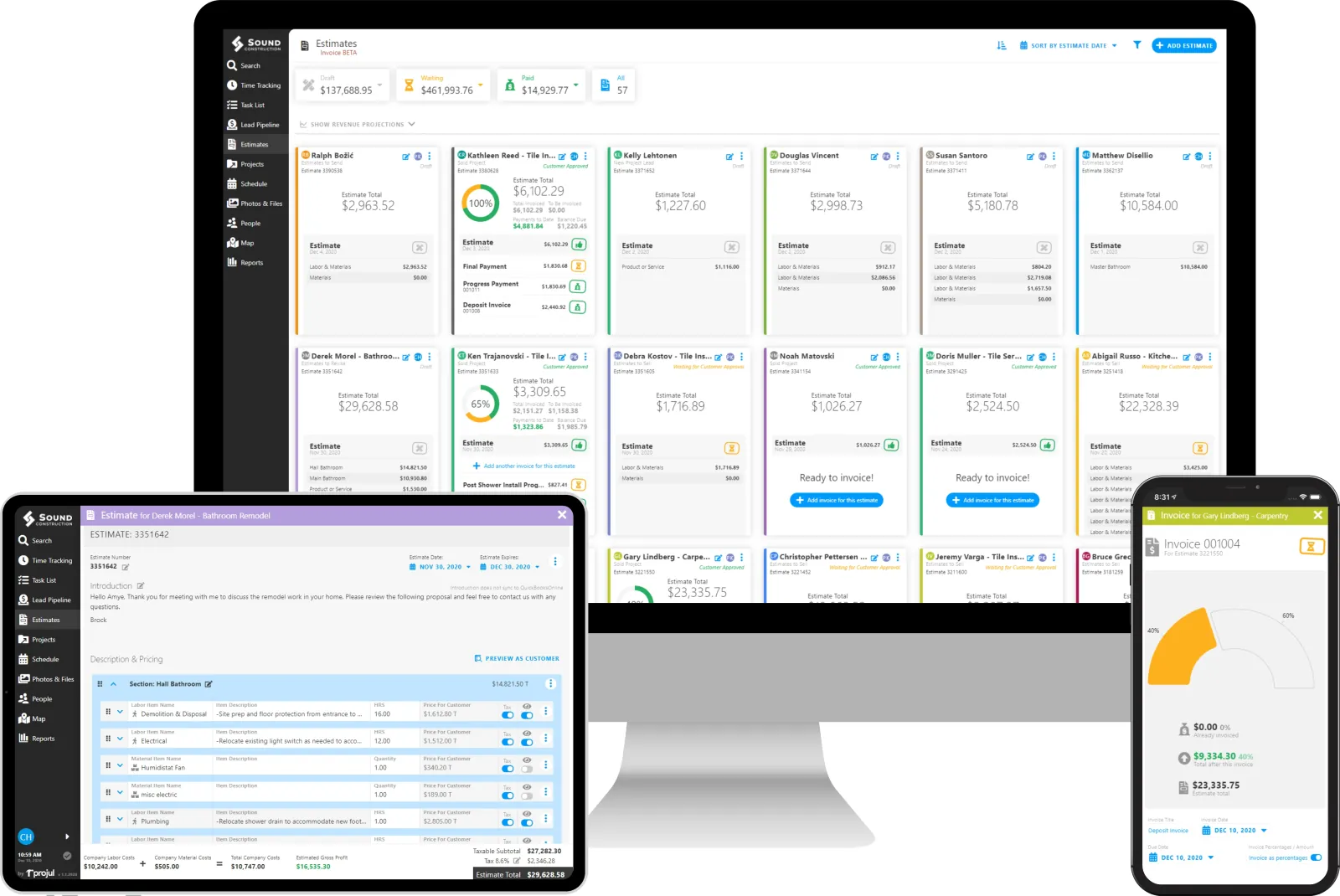
An end-to-end construction-management platform spanning CRM, estimates, signatures, scheduling, jobs, invoicing, payments, time tracking and reporting.
Construction Management SaaS
Projul Projul
Lead Engineer · App V2
System map · Transformation
Verified proof
- Improved project performance by 80% The verified outcome for App V2
- One data layer, two protocols Protocol choice never leaks into components
Refactor path
Legacy frontend
The first-generation application
Component architecture
Shared conventions, one state model
Optimised data flow
One data layer over GraphQL and REST
Performance
Rendering at real list sizes
What held it together
- Shared component conventions
- One state-management model
- A single data-fetching layer
- End-to-end tests over critical journeys

Engineering
React · React Query · Redux Toolkit · Web Workers · GraphQL · REST
Public product · Proprietary source code
- Role
- Lead Engineer · App V2
- Disclosure
- Public product · Proprietary source code
The problem
What the system had to solve.
An end-to-end construction-management product needed a scalable second-generation web application for complex operational workflows.
What I owned
The responsibility behind the work.
Led development of appv2.projul.com across its frontend and backend architecture.
Led development of Projul’s second-generation web application across frontend and backend architecture, building complex workflows for projects, customers, contractors, scheduling and operations.
Engineering approach
How it was built.
Developed workflows for projects, customers, contractors, scheduling and operational management, alongside performance and frontend architecture improvements.
Refactor path
- Legacy
- Component architecture
- Optimized data flow
- Performance
A second-generation application
Rebuilding a product people already depend on.
A construction-management platform is not one feature. It is a CRM, an estimating tool, a scheduler, a job tracker, an invoicing system and a reporting surface, all operating on the same customers, jobs and contractors, and all in daily use by businesses whose work does not pause for a rewrite.
The second-generation application had to carry that surface area while being faster than what it replaced. Users do not experience a rewrite as new architecture; they experience it as whether the screen they open fifty times a day got better or worse.
The operational surface
Commercial
- CRM and customers
- Estimates
- Signatures
- Invoicing and payments
- Accounting sync
Delivery
- Jobs and projects
- Scheduling
- Contractors
- Time tracking
- Reporting
Two ends of the same record
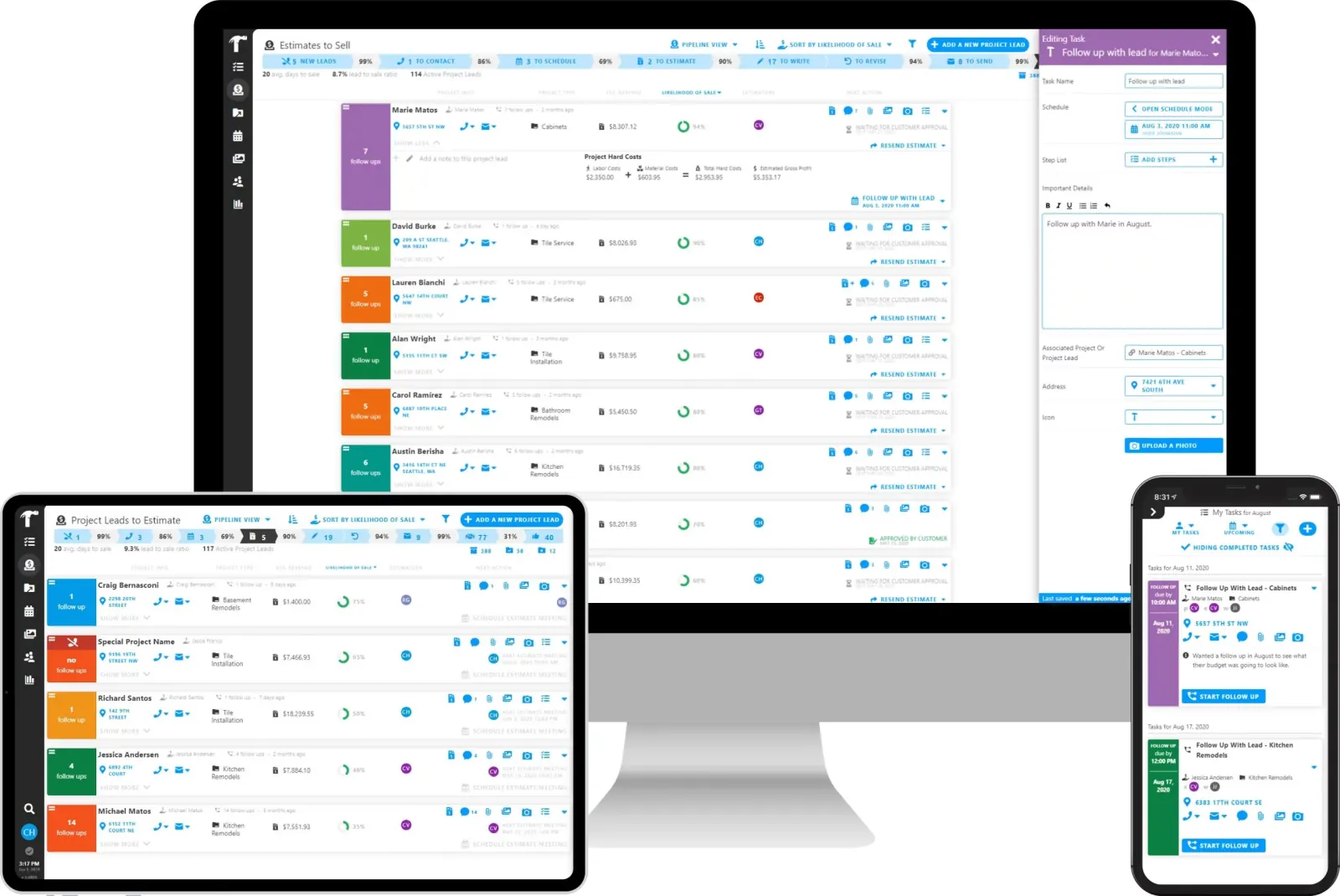
Commercial — the lead pipeline, from a new lead through to an estimate waiting on the customer
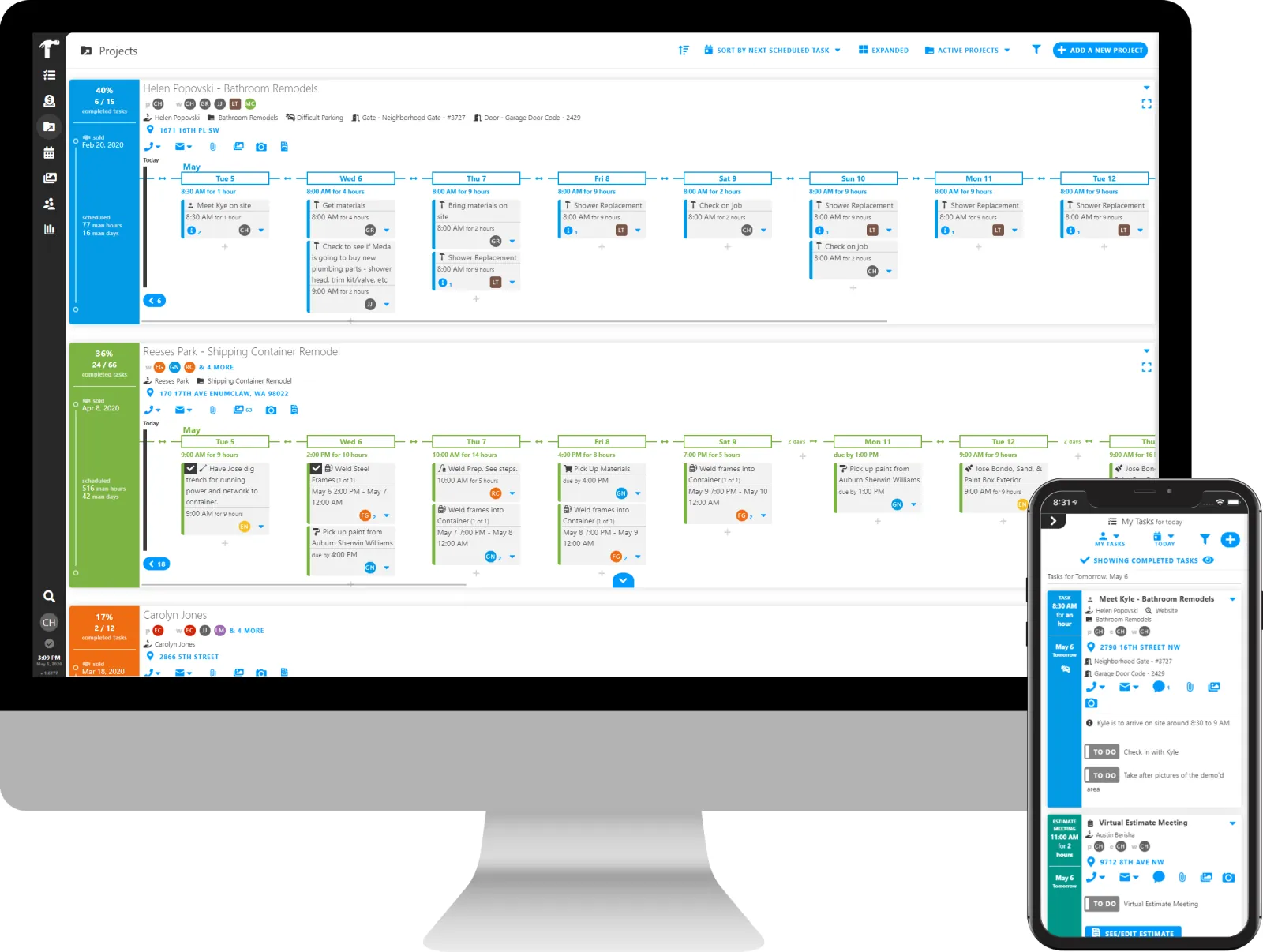
Delivery — the same work once it is sold, scheduled out day by day
Where the time actually went
Performance work on a data-dense application.
The slow parts of an operational product are rarely the network. They are long lists rendered in full, expensive derivations recomputed on every render, and the same data refetched by four components that each believed they owned it. The performance work targeted those three in order.
Virtualised lists
Long schedules, job lists and customer tables render only what is on screen, so list length stops determining frame rate.
Memoised derivations
Expensive computed values are cached against their inputs rather than recalculated on every render pass.
Server-state caching
One cache for fetched data, shared across components, so the same record is not requested several times per screen.
Work off the main thread
Heavy computation moved off the render thread, so a calculation cannot make the interface stop responding.
Local persistence
An in-browser store for data that would otherwise be refetched on every navigation.
Deliberate state boundaries
Server state and client state kept in separate systems rather than one global store holding both.
What the derivations are for
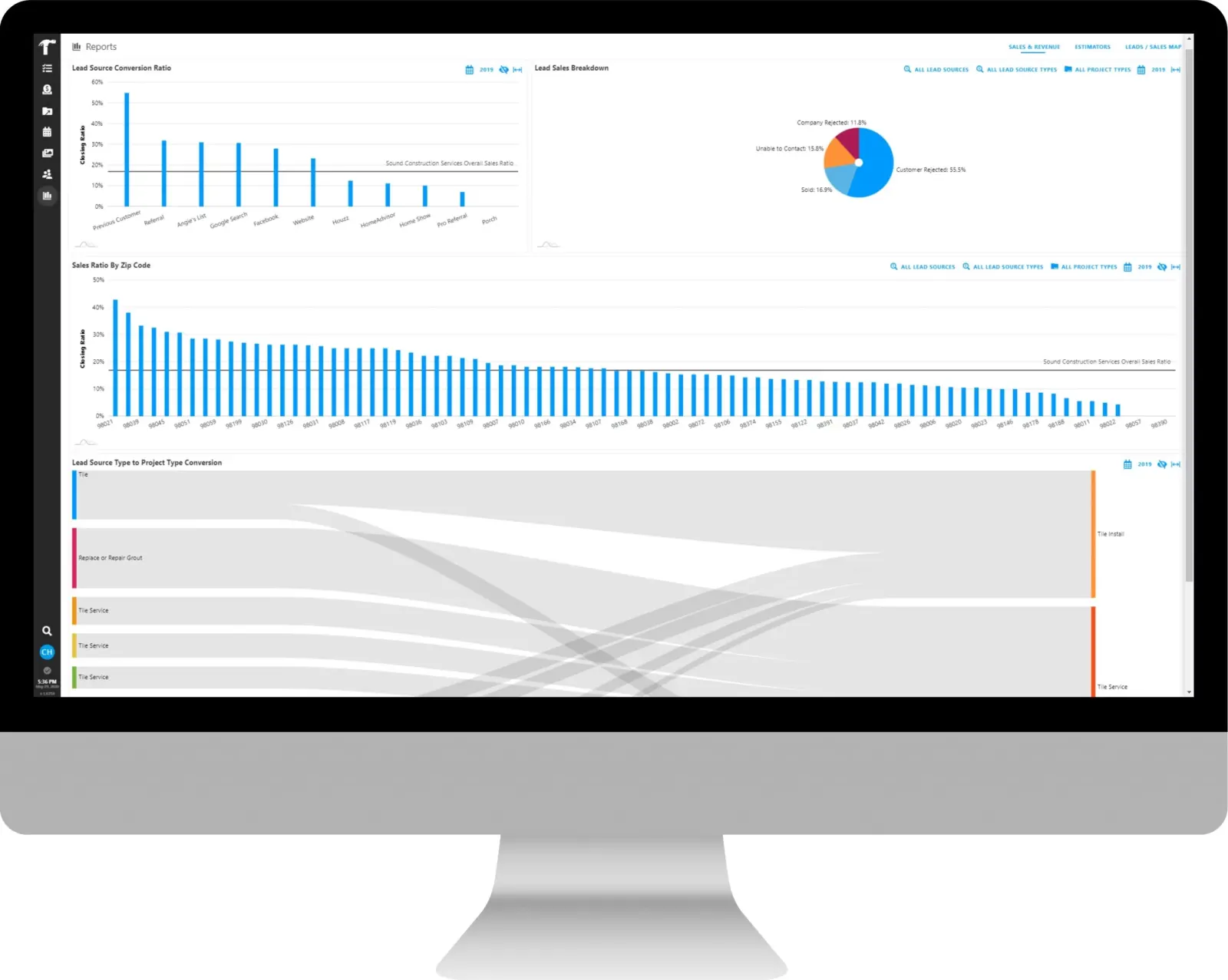
Reporting — closing ratio by lead source, sales ratio across every zip code the business works in, and lead source flowing through to project type
The distinction that made the most difference: server state is a cache of something that lives elsewhere, and client state is owned by the interface. Treating them as one thing is what makes a large front end slow and hard to reason about.
Scheduling and jobs
The screen the business actually runs on.
Scheduling is where a construction business is coordinated: crews, jobs, days, and the constant reshuffling that happens when a delivery slips. It needs multiple calendar perspectives, direct manipulation, and time handling that survives users in different time zones from the jobs they are scheduling.
What the scheduling surface required
- Day, week, list and timeline perspectives
- Drag-and-drop rescheduling
- Time-zone-correct handling
- Interaction at list sizes that defeat naive rendering
The same schedule, three ways
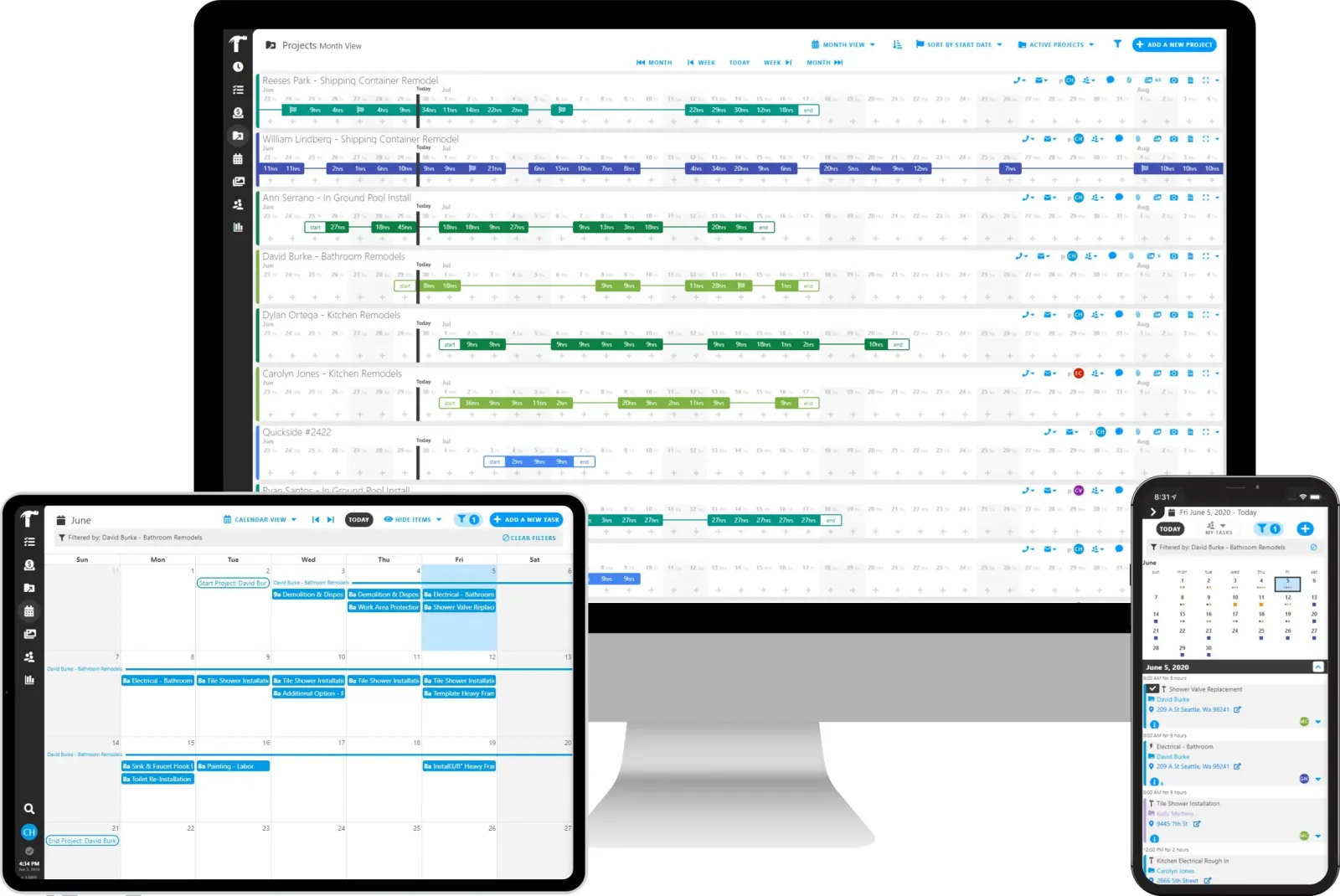
A month across every active job on the desktop, one job as a calendar on a tablet, and one day in the crew’s hand
Two data protocols, one client
Talking to a backend mid-transition.
The application consumes both GraphQL and REST. That is the normal condition of a second-generation client built against a backend that is itself evolving: some surfaces have moved, others have not, and the client cannot wait for the migration to finish before shipping.
Keeping that manageable
Contained
- Fetching isolated behind a data layer
- One caching model over both protocols
- Components consume data, not transports
Deliberately avoided
- Protocol choice leaking into components
- Two caching strategies in one application
- Migration state visible in feature code
Integrations and the surrounding surface
What a construction product has to talk to.
An operational product of this kind is judged partly on what it connects to. The application carries enterprise identity providers, rich document editing for estimates and scopes, mapping for job locations, data import for onboarding a business’s existing records, drawn signature capture, error monitoring so production problems are seen rather than reported, and the accounting service the business already keeps its books in.
Integration surface
- Accounting sync
- Enterprise identity providers
- Rich text editing
- Mapping and location
- Bulk data import
- Signature capture
- Charting and reporting
- Error monitoring
- Internationalisation
All but one of these are things the application draws with. The accounting service is not one of them, and the chapter that follows is about the difference.
QuickBooks
Integrating with a system of record you do not own.
A construction business does not keep its books in its project software. It keeps them in QuickBooks, and it has kept them there since before it bought anything else. That makes the accounting integration unlike every other one in the product: the rest are components the application draws with, and this one is a second system of record that already holds the customer, already holds the invoice, and is the copy the business’s accountant will believe.
Projul syncs customers, estimates, change orders and invoices out to QuickBooks, and reads payments back. The engineering problem was never the API call. It is that two systems now hold the same commercial record, they are able to disagree, and the person who finds out is a contractor trying to invoice a finished job.
Two QuickBooks, two different integrations
QuickBooks Online
A hosted service the company authorises once, and one the application can reach whenever it has something to send.
- Connected by the company from its own settings
- Sync runs against a service that is always up
- Payments recorded in QuickBooks come back by webhook
QuickBooks Desktop
A company file on a machine in the office, reached through a connector installed next to it.
- A sync manager is installed alongside QuickBooks itself
- The company file grants that connector standing access
- The office machine has to be left running for a sync to land
Both ends of the sync
The records that cross — estimates, their change orders, and the invoices raised against them

The desktop connector asking a company file for standing access
What crosses the boundary
- Customers
- Estimates
- Change orders
- Invoices
- Line items and costs
- Payments, coming back the other way
Sync state belongs to the record
Every synced record carries its own status, service and last attempt, so the interface says “last synced” or “failed sync” on the invoice that failed rather than raising one banner over the whole company.
Order is a real dependency
An invoice cannot exist in the accounting service before its customer does. That dependency is surfaced where the record is edited, so the failure is explained at the point where somebody can act on it.
Their constraints become our validation
QuickBooks limits how long a document number, a name, a SKU or a custom field may be. Those limits are enforced in Projul’s own forms, so a name is refused while it is being typed rather than at sync time, hours later.
One shape, argued per company
Estimates sync itemised or non-itemised — set once for the company, or left to be decided by each estimate, because both kinds of business are real.
Not everything should cross
Fields that are the product’s and not the ledger’s — the covering note at the head of an estimate, among others — are marked in the editor as not syncing, rather than quietly going missing.
Payments can be handed back
Payments entered in QuickBooks flow into Projul on a webhook, and a company that would rather keep the two ledgers apart can turn that off without giving up the rest of the sync.
The rule the whole integration is built on: fail on the record, not on the company. A broken sync should tell one person which invoice to fix, not tell an office that accounting is down.
Leading the work
Four people, one application, no pause in service.
The front-end team was three React developers and a UX designer. On an application this wide, the leadership problem is consistency: four people can each build a correct screen and still produce four different products if the component and state conventions are not held.
What held it together
- Shared component conventions
- One state-management model, applied consistently
- A single data-fetching layer
- End-to-end tests over the critical journeys
- Error monitoring in production
Engineering scope
What I worked on.
- Second-generation web application architecture
- Project and customer workflows
- Contractor and scheduling operations
- Frontend performance and state management
- GraphQL, REST and end-to-end testing
Why these decisions mattered
The trade-offs behind the rebuild.
Separate server and client state
Virtualise before optimising
Heavy work off the render thread
Contain the protocol mixture
Sync state on the record
End-to-end tests on the critical paths
Impact
The verified result.
Improved project performance by 80%.
Technology
The technical surface.
- React
- React Query
- Redux Toolkit
- Web Workers
- GraphQL
- REST
- QuickBooks API
- Selenium